System Design Interview Part 2

I recommend reading Part 1 of System Design Interview before starting Part 2.
In the previous post about system design, we discussed the thought process, designing scalable systems, covering vertical and horizontal scaling, reliability, and fault tolerance. In this article, we continue exploring core system design concepts, including TCP/UDP, DNS, HTTP, and SSL/TLS.
# TCP/UDP
In the world of system design, understanding how computers talk to each other is essential. Whether you are browsing a website, playing a game, or making a video call, several layers of protocols work together to make that experience seamless.
The Internet runs on a system called TCP/IP, which makes sure data travels correctly from one place to another.
- IP (Internet Protocol): IP acts like a digital GPS - routing packets of data to the correct destination address
- TCP (Transmission Control Protocol): While IP finds the address, TCP ensures that the data arrives in the correct order and without errors. It does this through a process called a 3-way handshake, where two computers "introduce" themselves before exchanging data. If a piece of data is lost during transit, TCP identifies the gap and triggers a retransmission of the lost package. TCP ensures that all sent packages will be fully delivered with the correctly order.
# TCP vs. UDP: Reliability or Speed?
Not all data needs to be perfectly ordered. Depending on the goal, developers choose between TCP or UDP.
- TCP: Used for things that must be perfect, like loading a webpage (HTTP) or sending an email (SMTP). It is reliable but slower due to the overhead of the handshake and error-checking.
- UDP (User Datagram Protocol): UDP does not require a handshake or a persistent connection. The client sends a request, and the server starts sending data immediately. If a part of the data is lost, it is never resent, and the order of packages is not guaranteed.
UDP is fast. It is the standard for video streaming, online calls, and online games, where a tiny bit of lost data (ex: video frame) is better than waiting for a retransmission (sending data again).
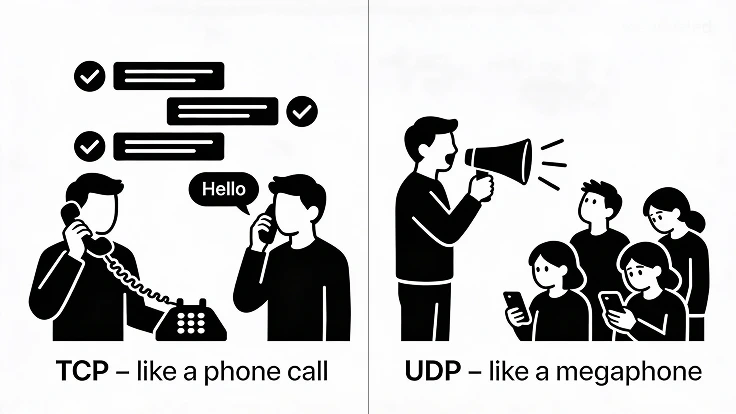
Think of TCP as a phone call where you wait for the other person to say "Hello" before talking, whereas UDP is like a megaphone where you start shouting regardless of who is listening.
# DNS
When we type google.com in the browser, our browser doesn't actually know where that is. It needs an IP address. This is where the Domain Name System (DNS) comes in.
# How DNS finds a domain's IP address?
Usually, we use the network provided by our Internet Service Provider (ISP). When we enter a domain name in the browser, it first checks the browser cache for a stored IP address. If it doesn’t find one, the request goes to the ISP’s cache. If the record still isn’t found, the system then queries the DNS hierarchy to locate the correct IP address.
# HTTP: The Language of the Web
HTTP (Hypertext Transfer Protocol) is an application-level protocol that sits on top of TCP. It follows a Client-Server model, where a client (browser) initiates a request and a server provides a response.
Every request and response contains headers, which provide metadata like the URL, status code and the method used: GET, POST, PUT, DELETE (most used one's)
- 🔍 GET: This is used to "get" data. It typically does not contain a request body, so any information (like search terms) must be stored directly in the URL (as query strings)
- 📤 POST: Used to send data to the server, typically to create a new resource (e.g., submitting a form or adding a user). Data goes in the request body, not the URL
- 🔄 PUT: Used to update or replace an existing resource with the complete new version provided in the request body.
- 🗑️ DELETE: Used to remove a specific resource from the server.
# HTTP Status Codes
Servers use numbers to tell the client what happened with their request.
- 100-199 (Informational): The request was received, and the process is continuing.
- 200-299 (Success): Everything worked! (e.g., 200 OK, 201 Created).
- 300-399 (Redirect): The resource has moved to a different location.
- 400-499 (Client Error): You (client) did something wrong (e.g., 401 Unauthorized).
- 500-599 (Server Error): The server crashed or failed to do its job (e.g, 502 Bad Gateway)
# Security: SSL, TLS, and HTTPS
Basic HTTP is not secure; anyone "listening" on the network could read your data. To fix this, we use SSL/TLS (Secure Sockets Layer / Transport Layer Security). This technology encrypts everything you send, making it unreadable to hackers. HTTPS is simply the secure version of HTTP, meaning all communication is encrypted via SSL/TLS.
# Summary
- IP (Internet Protocol): IP is responsible for routing packets of data to their intended destination.
- TCP (Transmission Control Protocol): Ensures error-free, ordered data delivery using a 3-way handshake and retransmission for lost packets.
- UDP (User Datagram Protocol): Faster than TCP since it skips handshakes and error checking; ideal for streaming, online calls, and gaming, though it doesn’t guarantee order or retransmission.
- DNS (Domain Name System): This system finds the IP address associated with a domain name. The process usually involves the browser or the ISP (Internet Service Provider) checking a cache.
- HTTP (Hypertext Transfer Protocol): An application-layer protocol built on top of TCP using a client-server model, where requests include headers and often a request body (except GET requests, which typically do not have a body).
- Security (SSL/TLS and HTTPS): SSL/TLS is used to encrypt any data sent over the internet to keep it private. HTTPS is simply the secure version of HTTP that uses this encryption.